The Nature Of Code in BASIC256 - Content
Chapters
1. Randomness
2. Balls (originally 'Vectors' but... BASIC256)
3. Forces
4. Oscillation
5. Particle Systems
6. Agents
Particle Systems
Intro
A particle system is a collection of independent objects, often represented by dots or other simple shapes. Over time, particles are created in the system, move and change according to the rules in the system and then can be removed from the system
Particle systems are widely used in video games, animations and video effects to create all manner of complex things like fire, smoke, flocks of birds, meadows etc
I previously made a number of particle programs in BASIC256 that you can find here
Later, we will be storing our particles (tens, hundreds, thousands) in one big two-dimensional array where the first element is the number of particles and the second, the properties of these particles.
Unfortunately, having no Object-Oriented Programming (OOP) capabilities in BASIC256, we cannot use nice things like inheritance and polymorphism
Let's start simple with a single particle. no array required. This particle will have, like the early movers, a position, a velocity and an acceleration and a lifespan. It will be influenced by some gravity and will fade until it is dead. After that, a new particle will be created
Single particle
And this is what it looks like:
Particle system
Of course, a particle system with a single particle is a bit useless. We could add a second particle by duplicating the particles properties, so using pos_x1 and pos_x2 and so on. Even a third particle would be feasible via pos_x3 etc.
But what if we want tens, hundreds, thousands of particles? Another manner is needed and this is to use a two-dimensional arrays. Such an array has 2 elements that can be compared to a spreadsheet: the first element designates the number of rows (here: particles), the second the number of columns. (here: particle properties)
Best we can do is to use the following example code for the array declaration:
max_particles = 80
  dim particles(max_particles,7)
  pos_x = 0
  pos_y = 1
  vel_x = 2
  vel_y = 3
  acc_x = 4
  acc_y = 5
  Lifespan = 6
Here we create a maximum of 80 particles each with 7 properties (additional properties are of course possible like mass, color, size,..)
We store the array index (arrays start at 0!!) in a declarative name because particles[10, acc_x] is a lot more readable than particles[10, 4]
We are now ready to create our 'real' particle system
Multiple Particles
And this is what it looks like:
Emitters
In 'The Nature of Code'-book, everything is explained in terms of Javascript and the p5.js library in particular, so everything is defined in OOP terms such as classes, methods, instances etc. BASIC256 has none of that.
The particle emitter examples in the book cannot literally be done in the same manner in BASIC256 but that doesn't stop us from doing similar looking things in BASIC256.
So I give you Multiple Particle Emitters in BASIC256!
Multiple Particle Emitterss
And this is what it looks like:
Particle Systems with Forces
Our third particle system is quite similar to the previous ones but here, forces are actually calculated while previously, we just added a gravity vector.
Particles simply fall down at a universal speed and we also give each particle some mass (between 0.1 and 2.1) This allows us to use other forces like wind, drag,...
This example has gravity and wind (controlled by mouse). Here, as seen by the relative size of the particles, heavier/bigger particles are less influenced by the wind than the lighter/smaller ones
Particle Forces
And this is what it looks like:
Particle Systems with Repellers
Currently, we have an attractive force, gravity, that pulls all objects down, regardless of height or weight. Here we want to create a repelling force, not just the opposite of gravity but assigned to an object, a repeller object if you will
Unlike universal gravity, the repeller object will influence each object differently based on mainly distance but also speed and weight.
I have added a switch (sw_mouse) in the ScreenSetup so you can have your mouse acting as repeller object
Particle Repeller
And this is what it looks like:
Smoke textures with additive blending
The Nature of Code chapter has a piece on image textures and blending. It can do that because it has functions like tint (which tints an image using a color) and blendmodes like additive blending.
BASIC-256 can load images but can't change the tint and although there are no specific blend modes, using alpha allows you to do additive blending
So, while we still want a smoke simulation, we'll take it step by step and start by creating our own fuzzy circle/smoke particle from scratch
We do this by creating filled in circles with a smallish alpha and ever decreasing radius.
Once we have that, we can decrease the alpha at every run so the smoke particle fades away.
Now that we have our fading smoke particle, we can go ahead and create a particle system using this fading particle.
Just like in the book, I added a visual wind indicator. Should probably go back and adapt the other programs using wind...
Smoke simulator
And this is what it looks like. The result is pretty nice for BASIC-256, no? (well, I think so...)
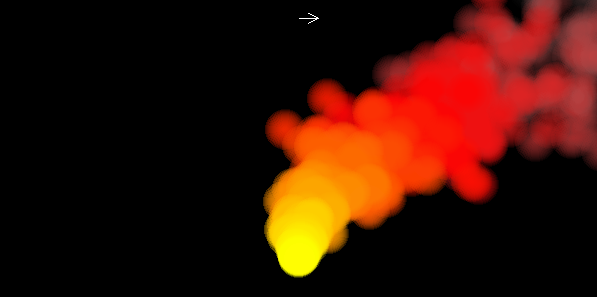
Not really covered in The Nature of Code, but to get something like a fire simulator, one could color the particles as they age using a gradient like this:

Fire simulator
And this is what it looks like. I prefer the B/W version