The Nature Of Code in BASIC256 - Content
Chapters
1. Randomness
2. Balls (originally 'Vectors' but... BASIC256)
3. Forces
4. Oscillation
6. Agents
Oscillation
Angles and rotation
Before getting to oscillation, we need to know about angles. Most of us think of angles in degrees. Thus, a circle is 360° (a leftover from the Babylonian civilisation, just like the 60 minutes/seconds), a right angle is 90° etc
An alternative unit of measurement and one we will use here, is Radians. One radian is a circle segment (an arc) where the lenght equals the radius of the circle itself. A full circle, measured like this has a lenghts of 2 times PI, so about 6.28318... radians. We will use this radians measuring unit when using trigonometry (sin, cos, tan,...)
Next to linear motion where the change of position in a timestep is on a line, there is also angular motion where the change in a timestep is in the angle. (You know this better as rotation). Using an angle and a radius to determine where a point is in space instead of using the classical (x,y)-coordinates, is called using polar coordinates
Below, you see two rotations, one in which the change in angle remains constant and one in which the change in angle increases
And this is what it looks like:
Directional Walker
In the beginning of this 'Nature of Code'-page, we showed Random Noise and Perlin Noise 'Walkers'. Both walkers moved by setting an random x- and an y-variable and then moving them accordingly
Here, we will start with an angle and have the walker walk in the direction of the angle. We will create two walkers, a first one consisting of a circle with the radius pointing in the direction to take. Angle change will be determined by Perlin noise
Our second walker will consist of a 'Asteroids'-like rocketship pointing in the direction it goes. Angle change will be determined by us tapping the left- and right arrow.
Here is what both walkers will look like:
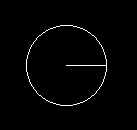

First, the circle moving along an angle with Perlin Noise changing the angle. The circle walker moves in the direction the radius points to
Walker with angular motion
And this is what it looks like:
Here, the 'rocketship' is steered by tapping the left- and right-arrow. Hmmm.. Could be the beginning of a Asteroids game coded in Basic256!
Steering a Rocketship
And this is what it looks like:
One thing that bothers me here is that if you make it come to a standstill, any rotation will make it rotate around its nose! (as that is the centre of the virtual circle used)
This can be changed by replacing the original code snipper with the following:
	# draw the rocketship.
	# we want to rotate around the middle of the rocketship, so we shift the drawing of the ship half a radius back
	middle = {pos[0] - cos(Angle)*radius/2, pos[1] - sin(Angle)*radius/2}
	color white
	line (middle[0], middle[1], middle[0] + cos(Angle-0.3)*radius, middle[1] + sin(Angle-0.3)*radius)
	line (middle[0], middle[1], middle[0] + cos(Angle+0.3)*radius, middle[1] + sin(Angle+0.3)*radius)
	line (middle[0] + cos(Angle+0.3)*radius, middle[1] + sin(Angle+0.3)*radius, middle[0] + cos(Angle-0.3)*radius, middle[1] + sin(Angle-0.3)*radius)
Now the spaceship will rotate around its middle!
Oscillation
Oscillation just means a back and forth movement around a single point. Our first example will be based on the sin() function as this oscillates around 1 and -1. In order to see it in screenspace, we will give it an Amplitude of 150 so it oscillates between 150 and -150
Another important element is the period, meaning the duration of a single complete cycle. Here we'll take 120 frames, meaning that the sin goes from 1 to -1 and from -1 to 1 this means we have 60 steps in one direction and 60 in the other for a total of about 2 seconds
As BASIC256 cannot set the framerate, we have to calculte something similar (using the Timer subroutine to count from 30 to -30 and back)
Oscillation 1
Here is what the oscillation looks like. You can visualize it as seeing a metronome from the top (or a pendulum from the bottom)....:
Instead of the formula "current amplitude = amplitude * sin(2*pi*Frame/period)", we can also just have a small angleVelocity that gets added to the angle at every iteration, so the formula becomes "current amplitude= amplitude * sin(angle)". Not as technically correct, but gives the same result....
Oscillation 2
As you can see when you run it, it looks exactly the same
So our first oscillation used sin() and moved left to right. This was because we just changed the x-position (pos[0]). We can add a second oscillation using sin() and add this one to the y-position (pos[1])
This results in a completely different motion
Double Oscillation
Here is what the double oscillation looks like:
Using the same 'big array' -method as before, we can have several oscillators in the same program...
Multiple Double Oscillations
Here is what the double oscillation looks like (mp4 encoder can't really follow...):
Waves
So, we have had circles oscillating back and forth. What if we made a series of slightly overlapping circles oscillating up and down, but with a small offset in the angle
Well, this will look like a wave or a tentacle
This wave doesn't really cover new ground, but is just an application of sin() you could use to animate something
Simple Wave
Here is what the wave looks like:
Spring Forces
Playing with angles and the sin() function is great fun, but there is nothing physical in these programs, no Newton's Laws of Motion or such. Let's move more into the world of physics and try to model a spring.
The force of a real spring is calculated with Hook's Law. This states that the force (F) needed to extend or compress a spring by some distance (x) is directly proportional to that distance, expressed as F = -kx. The spring constant (k) measures stiffness, where a higher value means a stiffer spring.
The spring also has a 'resting length', ie the spring with no weight attached
Simple Spring
Here is what the spring looks like:
Pendulums
Our next simulation will be of a pendulum. A pendulum is a bit like our spring, but completely rigid: it has an anchor (pivot) for the fixed-length arm and a weight/bob is attached at the end of that arm. A pendulum at rest simply hangs down. A pendulum not at rest has forces working on it: gravity and tension
The motion of the pendulum will be described thru angels and angular velocity. It will still be a very simplyfied simulation, missing a lot of real-life concepts.
Of course, you can find all the details on the pendulum simulation much better explained in 'The Nature of Code' itself
Pendulum
Here is what it looks like:
We can even extend this to a double pendulum although we're getting further from a real-world simulation.
A video by Schiffman on creating a correct double pendulum implementation can be found here
Double Pendulums
Here is what that looks like: