The Nature Of Code in BASIC256 - Content
Chapters
1. Randomness
2. Balls (originally 'Vectors' but... BASIC256)
3. Forces
4. Oscillation
6. Agents
Moving balls
Bouncing Ball
An object can be considered to have a position, a speed and eventually an acceleration. This acceleration is the sum of all forces working on the object. Now the Nature of Code book gives a nice explanation via Newton's laws on these elements and I strongly recommend you to read these
The Nature of Code book however extensively uses vectors and vector math which are part and parcel of p5.js but don't exist in Basic256. While in Basic256 we can of course use simple variables for position and speed and acceleration like:
            pos_x=100
            pos_y=100
            speed_x=1
            speed_y=1
            acc_x=0.05
            acc_y=0.005
Instead, I opted to use arrays as these look a bit like vectors...
            pos={100,100}  In p5.js, this would be pos = createVector(100,100)
            speed = {1,1} In p5.js, this would be speed = createVector(1,1)
            acc = {0.05,0.005} In p5.js, this would be acc = createVector(0.05,0.005)
For our first simulation, we will use a bouncing ball with fixed position and speed and constrained to the plane (bouncing of the sides). There is no accceleration and no forces working on it so it's like a 'perpetuum mobile' that will run forever
Bouncing Ball
And this is what it looks like:
Acceleration - Constant (same direction), Random (any direction) and euh, directional (aiming at a target)
An object in motion can accelerate in a given direction, meaning at every time step its speed increases a set amount while the direction might change (but does not have to).
Our first example will be an object falling with no change in direction. In order to see the acceleration, we give it a trail and when it 'falls' off the bottom of the screen, it will reappear at the top. So, just the position will change, not the speed or acceleration
Constant Acceleration
And this is what it looks like:
Our first acceleration example had a velocity change in only one direction, namely down (y-direction). This made changing the velocity simply adding the y-component of the acceleration 'vector' (array) to the y-component of the position 'vector (again, array) in a loop.
The Nature of Code's Vector chapter, when talking about acceleration talks a lot about p5.js vectors. Like one can create a random2D vector, which returns a 'normalized' vector, ie a vector with lenght 1. Again I would suggest you turn to the source material for more info.
Our pos, speed and acc arrays each have two elements. So what is the vector? Well, think back to equilateral triangles from school:
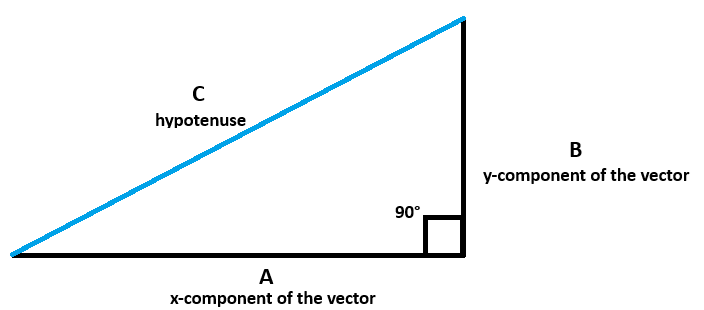
You probably remember that C²=A²+B² so, C = sqr(A²+B²). C is the 'vector', showing the size/magnitude of the step. In a 'normalized' vector, C always has size 1, so to get a 'normalized' array (vector!) in Basic256, we need to calculate C and then divide the x and y component by that C.
A Basic256 function can only return a single value, so I wrote 2 functions Normalize_a and Normalize_b. I can also do it by a single function mag(a,b) to calculate C itself and then divide the a and b by c. Drawback here is that one has to first store the vector values in scalars and then pass these to the function mag(x,y) wich returns C
Of course, in our example, the normalized vector is between -1 and 1. If we just used two random values between -1 and 1 using rand*2-1 we would get a non-normalized vector between 0 and sqr(2) (or 1.41421...) so the result would not really be visible here. However, if the x and y values are large (let's say >100), the normalized vector would give you the direction it points in, as we will see later
So a program moving and changing the ball's acceleration randomly could like this:
Random Acceleration
And this is what it looks like:
Our last acceleration example will have the object accelerate towards a moving target, namely the mouse!
So, we know the position of the object (its x and y values) and we know the position of the of the mouse (detected with mouseX and mouseY). We now subtract the object's position from the mouse's position. This gives us our equilateral triangle with the vector pointing from the object's position to the mouse but with the 'magnitude' of the vector set to the exact distance to the mouse. We do not want this or the object will have its velocity explode.
We now 'normalize' the vector so that is still points to the mouse but with a 'length' of 1. This becomes our acceleration. However, even if we add this acceleration of 1 to the velocity of the object, the velocity will grow much too fast, so we have to cap the velocity to a maximum speed of let's say 10. We could make the vector smaller but after a while the velocity would again get too large.
The object will never 'catch' the mouse but will always overshoot due to the velocity being to great for the acceleration to overcome. Best outcome is a sort of circular or ellipsoid orbiting of the mouse.
You can of course play with the acceleration setting or the velocity capping to see what happens.
Acceleration to Mouse
And this is what it looks like:
It does look nicer on a larger plane than the 400x400 of the video...